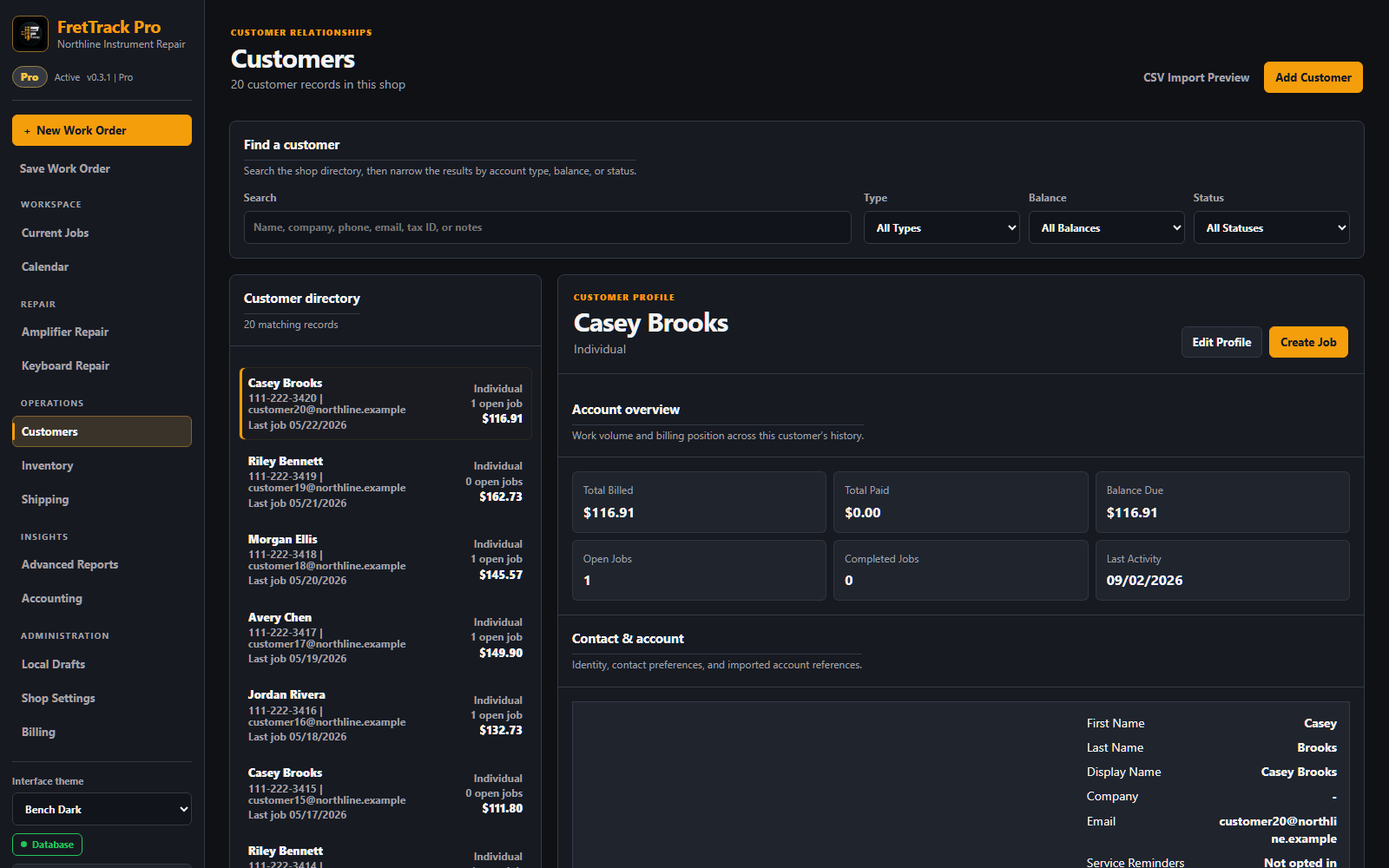
The responsive Customers workspace shown with fictional shop and customer data.
Create or select a customer
- Search for the customer before creating a new record.
- Select the existing record when possible.
- If the customer is new, enter first name, last name, phone, email, and useful notes.
- Record SMS, transactional email, or Automated Service Reminder opt-in only when the customer has agreed. Reminder consent is separate from ordinary job email permission. SMS consent can be recorded now, but FretTrack SMS delivery is not enabled.
- Connect new jobs to the correct customer record.
Use customer history
The Customers page uses one directory and profile workspace. Search and filters narrow the selectable directory; the open profile separates account totals, contact details, job history, payments, and shop notes. On a phone or tablet, those areas stack into one contained column.
Large directories show 100 customers at a time with Show more customers; search and filters still examine the full directory. Sort Job history by number, received date, status, total, paid, or balance; use Show more jobs for older records. Select a job number to open that work order, or its total, paid amount, or balance to open billing. Selecting a received date opens the All Jobs list for that day. Select Balance Due to open the one unpaid job or to show all of this customer's jobs with balances. Payment history links back to the relevant job.
When a customer returns, review previous jobs, notes, instruments, parts, work logs, reminder eligibility, and—on Pro—Loyalty progress and redemption history. This helps the shop repeat preferred setups, answer questions, and avoid duplicate customer records.
One payment covering several jobs
Verify the customer's payment first, then record its full amount and transaction reference on one work order. If that makes the job overpaid, the customer profile shows the excess as Available Credit. An owner or admin can use Customer credit to apply some or all of that excess to another work order directly linked to the same customer. Enter a reason and confirm. FretTrack records paired bookkeeping entries without creating another Venmo or card charge; the original payment stays on the first job.
If an allocation was wrong, an owner or admin can select Reverse credit allocation in the customer's Payments history. For a payment entered by mistake, use Void mistaken entry and enter a reason. FretTrack keeps the original record and correction for review. If credit was allocated from that payment, reverse the allocation first. A FretTrack void does not reverse money sent through Venmo, a bank, or a card processor; complete any real refund with the provider separately. Customer credit is bookkeeping inside the shop, not a stored-value account or an automatic payment service.
Save and reuse customer instruments
Open a customer profile and use Instruments to add the customer's guitar, bass, amplifier, keyboard, or other instrument. Record a nickname, type, make, model, year, serial number, color, finish, orientation, string count, and shop notes as needed.
During new work-order or estimate intake, select the customer first and then choose the instrument from Saved instrument. FretTrack fills the instrument identity into the new document and links the work order to that profile. For a new instrument, leave the selector on New / unsaved instrument and keep Save this instrument to the customer profile selected.
Each work order keeps its own instrument snapshot, so later profile edits do not rewrite prior paperwork. Archive an instrument that the customer no longer uses; archiving preserves its existing service history.
Read and route incoming email replies
- Open Messages from the left navigation.
- Use Refresh in the shop-wide Unassigned Inbox to load newly received replies.
- Review the matched customer, choose the correct work order, and select Route message.
- Open the customer's profile to review that customer's Conversation history. The shop-wide inbox is kept separate from customer profiles.
FretTrack does not guess a work order from an email subject. Replies remain safely unassigned until a staff member chooses a work order belonging to the matched customer.
Good customer notes
- Preferred contact method.
- Pickup availability.
- String or setup preferences.
- Approval requirements before ordering parts.
- Deadline notes tied to repair work.
Privacy and professionalism
Customer records can contain personal contact information. Keep notes focused on repair workflow and avoid unnecessary private details, gossip, or anything that would not belong in a professional shop record.
Automated reminders and Loyalty
A Pro shop can send a service reminder only when its shop rule is enabled and the customer separately opted in. Removing the customer's email also removes reminder consent when the record is saved. Loyalty stamps come from qualifying linked, fully paid, completed work orders; staff explicitly record reward redemption and apply any promised service or discount through the normal work-order billing controls.
In Shop Settings, Reminder Operations shows opt-in coverage plus scheduled, sending, retrying, sent, and staff-skipped reminders. Queue records identify the customer, service, source work order, due date, attempt count, and reason without displaying customer email addresses. Owners and admins can recheck eligibility, skip one pending or failed reminder with a required reason, or restore it to the ordinary eligibility checks. Staff skips survive automatic queue rebuilds, and reminder consent changes are retained in a shop-scoped audit history.
Every automated reminder contains a secure customer unsubscribe link. The link opens a confirmation page without changing consent; after the customer confirms, FretTrack disables automated reminders, cancels unsent reminders, and records the customer-link withdrawal in consent history. It does not disable ordinary work-order messages, estimates, invoices, or replies.
Read the complete Automated Service Reminders instructions for setup, status definitions, controls, safety rules, and troubleshooting.
Institutional and contract customers (Pro)
Pro shops can create a private contract profile for a school, college, studio, or other organization. Use the customer record for the institution (for example, El Camino College), then add the contract or account reference, quote/estimate number, purchase-order number and status, billing contact, service location, tax-exempt reference, dates, and an optional not-to-exceed amount.
Keep one work order per instrument. On each instrument's work order, choose the shared institutional contract. This keeps acoustic, classical, and other instruments separately identifiable while grouping them under the same quote and PO. FretTrack does not automatically order from a supplier or approve extra work; staff must review changes and update the quote/PO reference before invoicing.
Contract estimates appear in the main Estimates workspace alongside work-order estimates. Select Open contract estimate to return to the institution, contract, and exact estimate version for review, revision, printing, or email delivery.
New contract estimates have No expiration date unless an owner or admin deliberately enables one. An issued customer copy is preserved, but it is not a dead end: open it and choose Create editable correction to make the next editable version. The correction starts without an inherited expiration date.
Shop-plan accounts do not see or access contract profiles. Contract data is shop-scoped and private to authorized staff.
Institutional property custody: for a contract-linked instrument, upload at least one condition photo, complete and acknowledge the Damage Map, then record the immutable receipt with the institution's asset tag, handoff representative, stated replacement value, staff attestation, and condition note. Record a separate release entry at pickup. This creates repair evidence; it does not provide insurance coverage.
Import customers from MusicShop360
FretTrack imports customer information from MusicShop360 customer CSV exports. Owners and administrators can open Customers, choose CSV Import Preview, select their export, review the results, and choose Import Ready Customers.
Names, company, email, phone and cell numbers, full postal addresses, and notes are supported. A cell number is used when the main phone is blank. Files may contain up to 25,000 customers; progress is shown as records are imported in batches.
Duplicate or invalid rows are skipped and available through Download Skipped/Error CSV. Shared family phone numbers or emails may need review. Existing customers are not overwritten.
This transfers contact information, not balances, transaction history, rewards, discounts, tax settings, inactive status, marketing consent, or custom fields. Keep your original export. If an import stops, review the reported progress and customer directory before starting another import, because earlier batches remain saved.
Troubleshooting
Owners and administrators can merge suggested duplicate customer profiles. Open the profile you want to keep, select Merge a duplicate, compare both records, and confirm the merge reason. Work orders and message history move to the kept profile; missing details and notes are preserved. Shared family contact information is only a suggestion, so verify both people before merging. Profiles with immutable transaction history cannot currently be merged.
If you cannot create or edit a customer, check your role. Viewer access is read-only. If a job is attached to the wrong customer, ask an owner or admin to correct the link if you do not have edit access.